Configuring the Service Address
Use CygNet Host Manager Service Address settings to specify the IP address to which the ARS binds. If your server has multiple Network Interface Cards (NICs), all will be listed and you can select the appropriate NIC.
All CygNet Services must be shut down before you can change service address details.
|
CygNet Host Manager Service Address Selector Dialog Box |
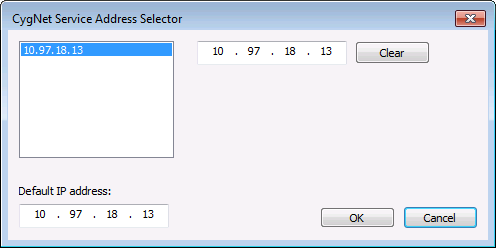
In the CygNet Service Address Selector dialog box, the IP addresses of the NICs are shown on the left. You can add another address by typing it in the address box and clicking OK. The Default IP address is the address that the services will bind to if the address is cleared.
To Change the Service Address
- Open CygNet Host Manager.
- Stop the services. Services must be stopped prior to changing these settings.
- On the Properties menu, click Service Address to access the CygNet Service Address Selector dialog box.
- Enter the desired changes to the IP address you would like the ARS to bind to.
- To use an IP address from the list, double-click the address. It will be displayed in the adjacent address box. Click OK.
- To remove the address, click Clear .
- To use a new IP address, type the address in the Default IP address box and click OK.
- Click Cancel to close the dialog box without making any changes.
- Start the services again for the changes to take effect.

